Let me ask you something. Have you ever said, “Our website is done,” and then never touched it again? Or wondered why it looks fine but doesn’t actually do much?
I hear this all the time from small business owners, church leaders, school administrators and nonprofit teams. The website launches, everyone celebrates, and then it quietly fades into the background, treated like a one-time project instead of something that’s supposed to work for you every day.
This article is about website foundations: the things that actually matter if your website is going to build trust, support growth and pull its weight long-term. No tech jargon and no scare tactics, just the stuff that makes or breaks a site.
Foundations before features
Your website is a decision-making tool. People land on it trying to decide whether they trust you and whether it’s worth taking the next step. (I break that down in What Is a Website Supposed to Do?.)
First impressions happen fast. If your site feels confusing, outdated, slow or unreliable, people don’t stick around to figure it out. That’s why the basics underneath have to be solid before anything fancy goes on top.
1. Clear purpose and messaging
One of the biggest mistakes I see is people obsessing over design while ignoring clarity. Design matters, but clarity matters more. When someone lands on your site, they should instantly understand who you serve, what you do and why it matters to them.
This shows up everywhere: business sites that talk too much about themselves, church websites that don’t explain what to expect, school sites that bury important information, and nonprofit sites that never clearly state the mission. A strong homepage doesn’t try to say everything. It says the right things clearly: who you help, what you offer and what the visitor should do next.
2. Reliable hosting, domain and email
This is the part nobody wants to think about until something breaks. Your hosting, domain and email are the infrastructure behind your website. You don’t see them, but they control speed, uptime, security and whether your emails actually get delivered.
Cheap or poorly managed hosting often means slow pages and random downtime. A weak email setup sends contact form messages to spam, or loses them entirely. An expired domain or security certificate puts up a warning that kills trust instantly. If your website feels unreliable, this is usually why. (Here’s what we offer for hosting, domains and business email.)

3. Design that builds trust
Good design isn’t about trends. It’s about usability. A well-designed website feels easy: text is readable, navigation makes sense and nothing feels confusing or broken. When design does its job, visitors don’t notice it. They just move through the site comfortably.
That matters most on phones, where people are the least forgiving. If buttons are hard to tap, layouts break or pages take too long to load, trust disappears fast. You don’t need cutting-edge visuals. You need a design that feels intentional, consistent and easy to use on any screen.
4. Contact information people can actually find
Your phone number, email and location are your customer’s direct line to you, so don’t make anyone hunt for them. Put your phone number in the header, your full contact details in the footer of every page, and make the number tappable on a phone. A dedicated contact page is still worth having, but it shouldn’t be the only place your number lives.
5. Security and ongoing care
Here’s the truth most people don’t want to hear: websites are never finished. They need updates, backups and monitoring, not because something is wrong, but because the internet keeps moving.
Small organizations often assume they’re too small to be targeted. In reality, unmaintained sites are the easiest targets. Problems rarely show up politely. They show up as Google warnings, broken pages, hacked redirects or a damaged reputation. Ongoing website care is part of having a responsible web presence. (More on that in how to secure your website.)
6. Visibility and findability
Just having a website doesn’t mean people will find it. Search engines care about structure, clarity and relevance. Clear headings, logical page structure, page titles that say what you do and where, and focused content all help Google understand what your site is about.
Your website should also work hand in hand with your Google Business Profile, so both say the same thing about who you are and where you work.
7. A way to measure what’s working
If you don’t measure it, you’re guessing. Google Analytics (free) shows how people find your site and what they do once they get there. Google Search Console (also free) shows which searches you appear for and flags problems Google finds on your site. Set both up once, then check them monthly.
8. Connection and communication
A website should make it easy for people to reach you and to stay in touch. That means forms that work, emails that get delivered, and a way to keep the conversation going after the first visit.
A blog gives you a place to answer the questions your customers ask, which helps both visitors and search engines. An email signup lets you stay in front of people who aren’t ready yet. Links to your social profiles help people follow along. All of that depends on a reliable foundation underneath.
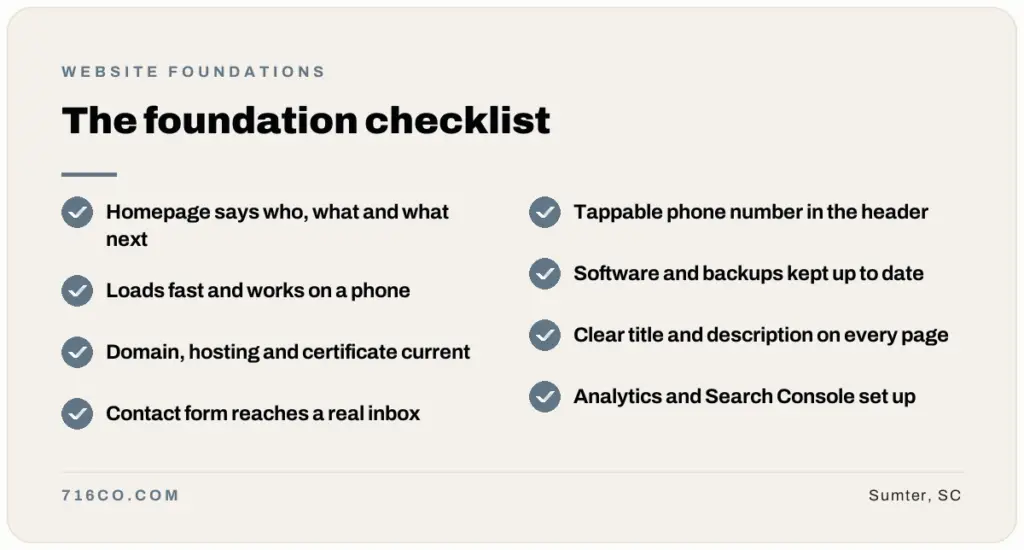
A quick website foundation checklist
- Your homepage says who you serve, what you do and what to do next.
- Your site loads quickly and works well on a phone.
- Your domain, hosting and security certificate are current and in your name.
- Your contact form delivers to an inbox someone actually checks.
- Your phone number is in the header and tappable on mobile.
- Software, plugins and backups are kept up to date.
- Every page has a clear title and description for search.
- Google Analytics and Search Console are set up.
- Your website and Google Business Profile match.
Why foundations matter more than features
Features are exciting. Foundations are effective. You can add every tool you want, but if the basics aren’t solid, those tools won’t deliver. Weak foundations drag down your marketing, search visibility and trust. Strong foundations make everything else easier.
Your website is working for you or against you every single day. It speaks when you’re not around and represents you before anyone ever calls, visits or reaches out. When the foundations are strong, it quietly builds trust and momentum in the background.
Frequently asked questions
Who should own my domain name?
u003cpu003eYou should. Your domain should be registered in your business’s name with an email address you control, even if someone else manages it for you. If a former web designer or employee owns it, get it transferred.u003c/pu003e
How often should my website be updated?
u003cpu003eSoftware and plugins should be updated as updates come out, which for most sites means at least monthly. Content should be reviewed at least once a year, and any time your services, hours or pricing change.u003c/pu003e
Do I really need a blog?
u003cpu003eNot every business needs one, but a blog is one of the best ways to answer customer questions and give search engines fresh, useful content. Even one helpful post a month adds up.u003c/pu003e
Not sure where your website stands? Request a free website audit and we’ll show you what’s solid and what needs attention, or see our website design plans.