Most business owners don’t know Google Business Profile has a posting feature. Of the ones who do, most have never used it. Of the ones who have, most posted a few times, didn’t notice an immediate result, and forgot about it.
That’s actually good news for you — because consistently posting on your GBP is one of the lowest-effort, highest-return moves available in local SEO. It signals to Google that your business is active. It gives potential customers something current and useful to read when they find your listing. And it takes about ten minutes a week.
This post covers everything you need: the different post types available, what to actually write about, how often to post, how to make the CTA button work for you, and a simple weekly system you can realistically stick to.
If you’re still setting up your GBP, start with our main guide: Your Google Business Profile Is Free Real Estate — Here’s How to Actually Use It. This post builds on that foundation.
Why Posting Matters for Local SEO
Before getting into the how, it’s worth understanding the why — because a lot of business owners treat GBP posts as optional extras, when they’re actually a meaningful part of your local visibility strategy.
Google’s local ranking algorithm factors in the recency and activity level of your profile. A business that posts regularly looks like an engaged, operating business. A profile that hasn’t had a post in five months looks dormant — and Google treats it that way. An active profile doesn’t just look better to potential customers; it performs better in rankings.
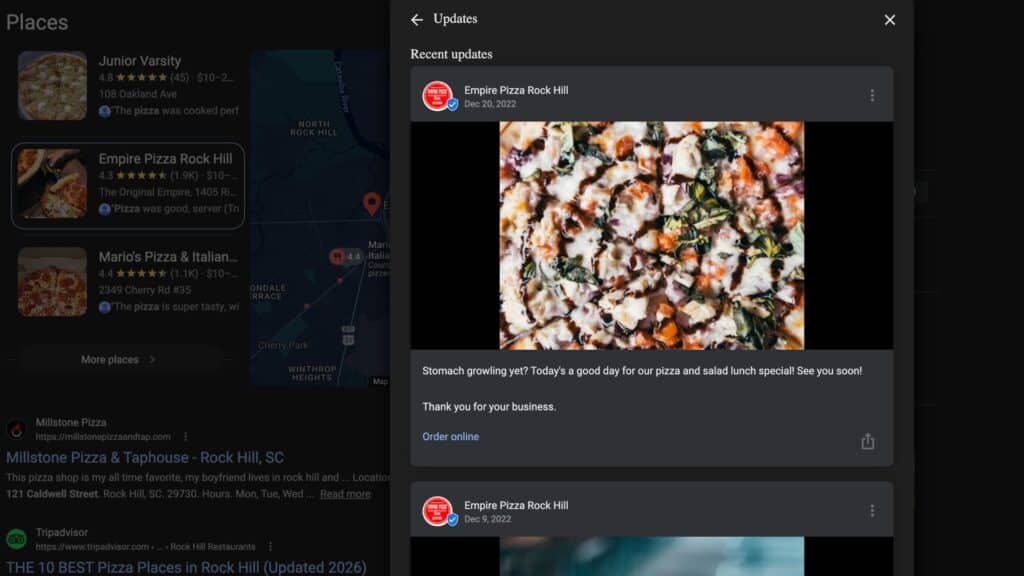
GBP posts also appear directly in your listing when someone searches your business name. Before a potential customer ever clicks through to your website, they may read your most recent post. That’s a direct content touchpoint — one that most businesses leave completely blank.
Posts with relevant keywords also contribute to your overall profile relevance, which is one of Google’s three primary local ranking factors. Every post is a small additional signal that reinforces what your business does and who it serves.
For more on how Google’s local ranking factors work, see How to Get Your Google Business Profile to Show Up in the Map Pack.
A profile that posts weekly looks alive. A profile that’s been silent for months looks abandoned. Google notices. So do potential customers.
What Types of Posts Can You Publish?
Google Business Profile offers several post formats, each with a slightly different purpose. Understanding the options helps you use the right one for the right situation.
- Updates: The most flexible format — a general post where you can share a tip, a piece of news, a link to a blog article, a completed project, a community moment, or anything else relevant to your business. This is the format you’ll use most often.
- Offers: A specific promotion or discount, with an optional start and end date. Useful for seasonal promotions, referral incentives, limited-time services, or special pricing for new customers. The offer shows up with a distinct visual treatment in your profile.
- Events: If you’re hosting or participating in something — an open house, a workshop, a community event, a webinar — this format lets you include a date, time, and event details. It’s underused by most small businesses and creates a great local presence signal when used well.
- Product/Service highlights: Spotlighting a specific service or product with a description, price range, and photo. Useful if you want to draw attention to a particular offering or if Google hasn’t automatically pulled your service listings into your profile correctly.
For most small businesses, Update posts will make up the majority of your content week to week. The other formats are useful situationally — Offers for promotions, Events for community involvement, and Product highlights when you want to feature something specific.
What to Actually Post — A Practical Content Mix
This is where most business owners get stuck. They know they should post, but they stare at the blank text field and have no idea what to write. Here’s a practical content mix that works for almost any small business:
- Link to your latest blog article. If you’re publishing content on your website — and you should be — every new article is an automatic GBP post. Write two or three sentences about why it’s worth reading and include the link. Done. That’s one post per week handled by your existing content.
- A practical tip related to your industry. “One thing most small business owners don’t realize about their website…” or “A quick check you can do right now to see if your GBP is costing you customers…” Short, specific, genuinely useful. No fluff.
- A recent project or win. Without violating client confidentiality, share something you completed recently. “Finished a website rebuild for a local nonprofit this week — love seeing organizations like this get the online presence they deserve.” Authenticity beats polish every time.
- An answered question. Take a question you get asked frequently and answer it directly in a post. “We get asked a lot whether you need a completely new domain name for a website redesign. Short answer: usually no. Here’s why…” This kind of content also supports voice search — Google sometimes pulls Q&A content directly from GBP profiles.
- Seasonal or timely content. “Spring is usually when businesses decide it’s time to freshen up their website or revisit their SEO. If that’s on your list, now’s a good time to reach out.” Tying your posts to what’s already on people’s minds makes them feel relevant rather than generic.
- A community moment. A Sumter event you attended or sponsored, a local business you want to highlight, something happening in your area. This shows you’re a real, present member of the community — not just a listing that exists online.
You don’t need all six of these every week. Rotate through them. One per week, whatever fits the moment. Over a month you’ll naturally cover a good mix without having to plan it out extensively.
How Often Should You Post?
Once a week is the right target for most small businesses. That’s enough to maintain an active signal without requiring a significant time investment. Twice a week is better if you can sustain it without it feeling like a burden. Daily is great — but only if you can keep it consistent. A sporadic burst of daily posts followed by six weeks of silence is worse than a reliable once-a-week rhythm, because the activity signal it creates is false and short-lived.
One important technical note: GBP Update posts are archived after approximately seven days and no longer appear prominently in your profile. This is part of why consistency matters more than volume. Ten posts in one day don’t create ten weeks of active signal — they create one week of heavy activity followed by a gap. One post per week creates a continuous, steady signal.
If you’re just starting out and the idea of weekly posts feels like too much, start with twice a month. That’s still dramatically better than zero, and it’s a habit you can build from. Most of your local competitors are posting nothing — any consistent posting puts you ahead.
Keep Posts Short and Direct
GBP posts are not blog articles. Two to four sentences is usually the right length. Get to the point quickly, say something useful or interesting, and give people somewhere to go.
Don’t write like a press release or a corporate announcement. Write like a person who knows what they’re talking about and wants to be helpful. The same voice you use in a conversation with a client is the right voice for a GBP post. Conversational, direct, no jargon.
Add a photo whenever you can. Posts with images get more engagement than text-only posts — not a small margin, a meaningful one. The image doesn’t need to be professionally produced. A clear, well-lit phone photo of a recent project, your workspace, your team, or a relevant visual is entirely appropriate and often performs better than stock photography.
Use the CTA Button
Every GBP post lets you add a call-to-action button. This is one of the most consistently underused features of the posting tool, and it’s one of the simplest ways to make your posts work harder.
The available button options include “Learn more,” “Call now,” “Book online,” “Get offer,” “Order online,” and “Sign up.” Choose the one that fits your post and link it to the most relevant page on your website — a service page, a contact page, a specific article, a booking form.
Even a simple “Learn more” button pointing to a relevant page on your website increases the usefulness of the post and gives potential customers a clear next step. Without a CTA button, your post is informational. With one, it’s a conversion opportunity. Use it every time.
The Simple Weekly System
If all of this still sounds like more than you want to manage, here’s the simplest possible system:
- Every time you publish a blog article, turn it into a GBP post immediately. Two sentences, the link, a photo from the article. That’s at least one post per week handled automatically by content you’re already creating.
- Keep a running list on your phone of questions your clients ask you. When you’re stuck for content, open the list and answer one. This takes five minutes and produces content that’s genuinely useful to the exact people you’re trying to reach.
- Set a recurring Monday morning reminder — ten minutes, one post. That’s the system. No editorial calendar needed, no content planning meetings, no agency required.
The businesses that show up consistently in local search aren’t doing anything complicated. They’re doing the basics consistently. GBP posts are one of those basics — free, simple, and more effective than most people realize because most people aren’t doing it.
If you’d rather have someone handle your GBP posting, review management, and overall profile maintenance while you focus on running your business, that’s exactly what we do. Visit our Google Business Profile management service page, check out our local SEO services, or run a free SEO audit to see where your overall presence stands right now.
Reach out at (803) 386-0380 or visit 716co.com/google-business-profile. We’d love to help.
Frequently Asked Questions
How often should I post on my Google Business Profile?
Once a week is the right target for most small businesses — enough to maintain an active signal without requiring significant time. Consistency matters more than frequency. One post per week every week outperforms sporadic bursts of daily posts. If you’re just starting out, twice a month is a solid first goal.
What types of posts can I publish on Google Business Profile?
GBP offers four post formats: Updates (general posts — the most flexible and commonly used), Offers (promotions with optional start and end dates), Events (for community involvement or hosted activities), and Product/Service highlights. Updates will make up the majority of your weekly content.
Do Google Business Profile posts expire?
Yes. Update posts are archived after approximately seven days and no longer appear prominently in your profile. This is why posting consistently matters more than posting in bulk — fresh content continuously replaces expired content. Ten posts in one day creates one week of activity, not ten.
Should I include photos in my GBP posts?
Yes, whenever possible. Posts with images get significantly more engagement than text-only posts. The image doesn’t need to be professionally produced — a clear, well-lit phone photo of a project, your workspace, or your team works well and often feels more authentic than stock photography.
What should I write about if I run out of post ideas?
Answer a frequently asked customer question, share a recent project or win, highlight a specific service, post a seasonal or timely tip, or link to a useful article on your website. Keeping a running list of questions your customers ask you is one of the best content banks you can build — it never runs dry and it produces content your exact audience is looking for.